Showing posts with label Roomba. Show all posts

Wednesday, 29 February 2012

Roomba - Serial port ahoy!

 In order to do anything fancy with the Roomba we're going to need to interface with it somehow. Fortunately iRobot have made this quite easy. The picture below illustrates the Roomba, simply sitting on my floor.

Roomba at charge, click the image for a larger version
Remove the tray and pop off the green decorative panel:

What have we here (click image above for larger version)
Note the little black circle on the right

Mini din connector (click image to for larger version)
The area encircled is a 7 pin mini din connector, click the image to get a better view. If your roomba was made after 2005 it should have one of these too. 

Access to all sensor information and Roomba functionality is available via this port.

I picked up an 8 pin mini din connector in Maplins (a UK high street components retailer) for £1.79:

8 pin micro din
They didn't have a 7 pin, and the 8 pin is compatible with the connector, so don't worry. Farnell are also really good for components in the UK, if you don't mind waiting for delivery. So the plan is to build a cable to allow me to communicate with the Roomba, and get it to do fancy stuff.

Cable you say? Trailing around the flat as that mechanical contraption leads it on a merry dance? Are you quite mad sir?

My plan is to use an Arduino board, with a wireless module which will sit on top of the Roomba, allowing wireless communication between the Roomba, my home network and the internet. 
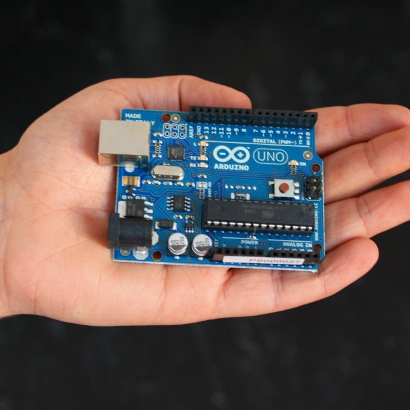
Not my arduino, or my hand.
An Arduino is an open source microcontroller allowing rapid prototyping and interfacing with other devices. You program it using the cross platform (Linux, Mac, Windows) development environment/ Additional hardware can be added in the form of 'shields', which are stackable on top of each other. There are a great deal of shields on the market, providing different features/functionality. I plan to use one shield to provide the wireless network functionality I require.

I happen to have an Arduino lying around, they're not terribly expensive. As it's open source there are several other implementations of the Arduino on the market, often referred to as clones. Some are application specific, for example the LilyPad, an Arduino compatible board aimed at wearable computing/sewable electronics. The schematics, all code and development environment are Open Source, so if you have the time and the skills you could build your own Arduino compatible board.

I digress. In my next post I'll describe the process of creating the cable.

For now I'll leave you with highlights of the 12/12/2011 LA Monome meetup, I wish I had been there:

Monday, 27 February 2012

Roomba - It's alive!

Just a quick video showing the fully charged replacement battery in action. Roomba is returning to the docking station. I cut out the sound as I had radio 4 on in the background. Higher resolution video available on YouTube.


Note that when it's cleaning the floor it moves much quicker, this is docking speed.

As previously mentioned, the roomba required a replacement battery. In my next post I'll detail how to diagnose charging problems. Is the base station broken? Is the charger faulty? Is roombas battery not holding charge? Stay tuned for some top roomba power diagnostic tips. Multimeter required!

Sunday, 26 February 2012

Welcome to the future

As a child of the 1980s as well as an unhealthy fear of nuclear war I grew up with various things which were constantly on my mind. I've always been interested in technology, it's applications and impact on society as a whole and to individuals.

For a while the shows like 'Tomorrows world', cartoons, the news and mainstream cinema made one thing clear, pretty soon we'll all have a robot in our house to do our bidding, whatever that may be at the time.

So towards the end of last year while browsing ebay I decided to bid on a robot I could have at home. For ~£50 I picked up an iRobot Roomba 530, sold as needing a replacement battery.

The Roomba is a circular robot which vacuums the floor. This is ideal for me, I can switch it on each day before I leave for work and it'll vacuum my flat, return to it's docking bay to recharge and all I have to do is empty it a removable section where the dust is stored into my bin. So while I'm getting paid to cut code and solve problems, the roomba is cleaning my flat.

A good clean (seriously, if you're going to sell stuff on ebay at least clean the items before you post them to someone) and a replacement battery was required before it was up and running.

This is a good start, but I want more from this device. I have a terrible habit of always wanting to modify or hack things I buy, the roomba is no exception.

This blog will start out with me describing my investigations into roomba hacks/mods. My basic research so far shows that with some basic DIY skills it's possible to add functionality to my roomba, some of which exists on newer more advanced (and expensive) models, some of which iRobot don't even support yet.

My next post will contain a breakdown of the roomba, outline the mods I initially plan on implementing,

I feel that a fitting way to end this introductory post is to sign off with a video combining Robots, Tomorrows world and Kraftwerk. So here's Kraftwerk's robots from around about 1991 (the Mix tour) on Tomorrows world: